File Management
Storage Spaces
DASSET does not expose the entire filesystem to ensure system files are not inadvertently removed or deleted. Additionally, this provides an extra layer of security where Owners or Administrator cannot access the data of other members on the device.
User data is exposed to through the implementation of three logical storage spaces in the DASSET system:
- My Space - Accessible only to the logged-in user. Other members cannot view or modify files saved here.
- Public Space - Accessible by all users bound to the DASSET device. Read/write permissions vary by user and can be configured.
- Group Space - Accessible only by users within the same group.
File Management Interface
The DASSET file browsing interface is similar to a standard file explorer UI, so you can use it with minimal learning.
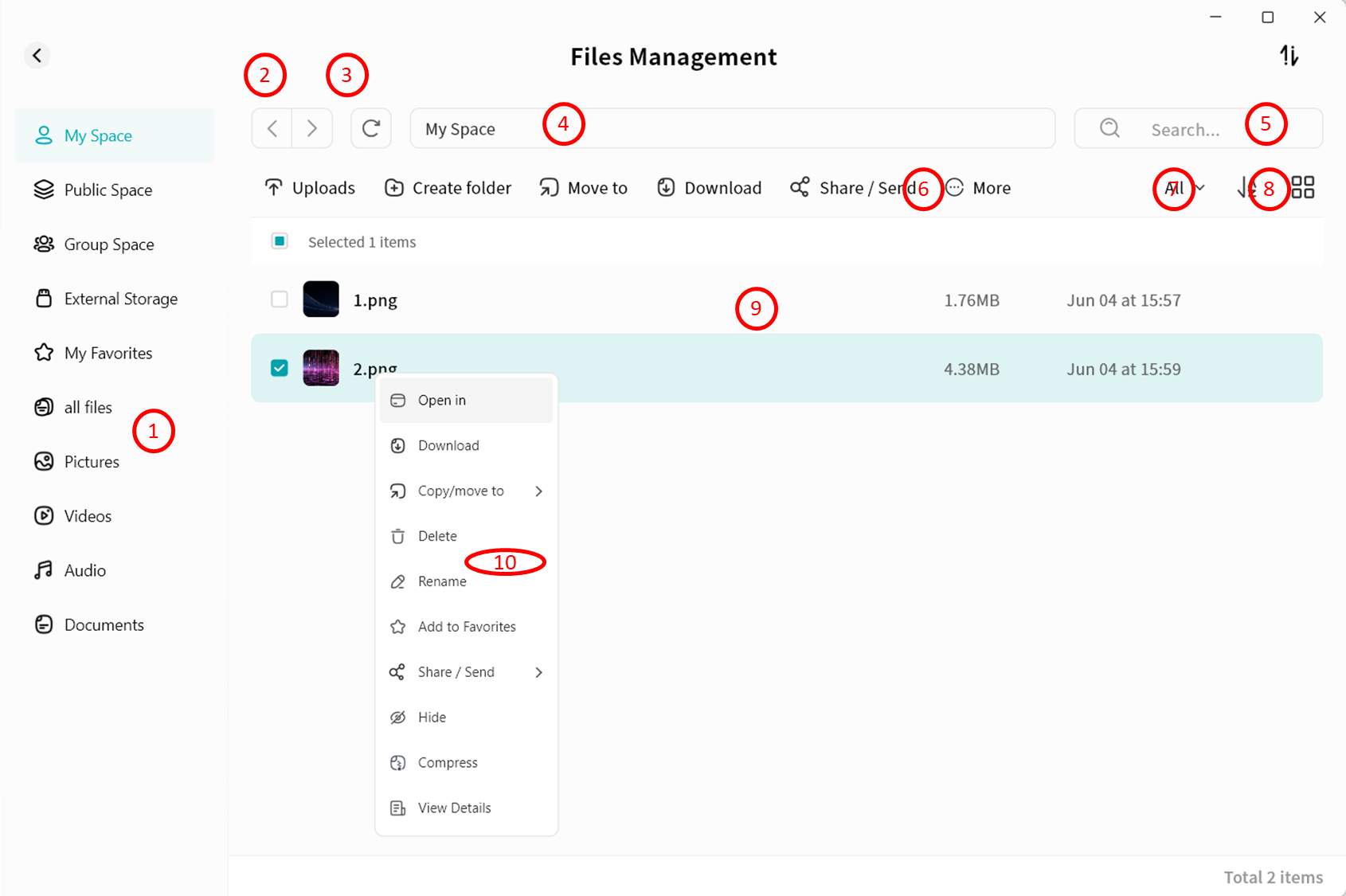
- Quick Space Entry: Switch quickly between My Space, Public Space, and Group Space.
- Forward/Back: Navigate to the previous or next directory.
- Refresh: Reload the current page to display the latest file changes (DASSET also auto-refreshes periodically).
- Full Path Display: Shows the complete path of the current page. You can click any folder in the path to jump directly to it.
- Search Bar: Enter a file name to search within the current directory and its subdirectories.
- Function Bar: Perform operations on files/folders, including upload, download, copy, move, share, and delete.
- File Filter Button: Display only certain file types, such as pc-images, videos, audio, documents, or compressed files.
- Sort and View Options:
- Sort files by name, size, or modification date.
- Display files in list view or grid view.
- File List Display: Shows file name, size, and modification date.
- Right-Click Menu: Provides the same operations as the Function Bar.
Quick Space Entry
You can click different entries to quickly access the root directory of each space:
- My Space
- Public Space
- Group Space: Displays all groups you belong to.
- External Storage: Includes USB-connected storage devices and internal drives configured as external disks.
- Favorites: Displays all files marked as favorites.
- All Files: Displays all files in My Space (folders not shown).